Repository và Unit of Work Pattern
A Repository, simply put, is a layer separating the Data Access Layer (DAL) from the Business Logic Layer.
Unit of Work is a technique for making sure that all related requests to the database run on the same DbContext
- 1. Entity Framework Core’s DbContext
- 2. Repository
- 3. Generic Repository
- 4. Creating the Unit of Work class
- 5. Wrap-up
1. Entity Framework Core’s DbContext
“I’ve been using it all along and never paid attention to what DbContext is” -> this is probably the common state for quite a few .NET-related technologies, where everything is already built and your only job is … to use it
DbContextis an entity representing a working session with the database, used to query and save your data
Since it only represents one session, in ASP.NET a new DbContext is created every time a new request comes in from the browser, and it gets disposed when the response is returned to the browser
Usually you inherit from DbContext, stuff more DbSets into it, and from there you can query all sorts of things
You can read more about setting up a
DbContexthere, section 3.2
1.1. DbContext Tracking
To keep the data consistent, DbContext uses a mechanism called tracking.
When you change a record (add, delete, edit), that change isn’t pushed to the database right away — it lingers. DbContext tracks that change.
Once you’ve made all the changes you need and call yourDbContext.SaveChanges(), the tracked changes get shipped down to the database.
So what does all of this have to do with Repository and Unit of Work? DbContext is an implementation of Repository and Unit of Work — it just sits deep inside the framework, while your implementation sits in the application
2. Repository
Here is a nice diagram
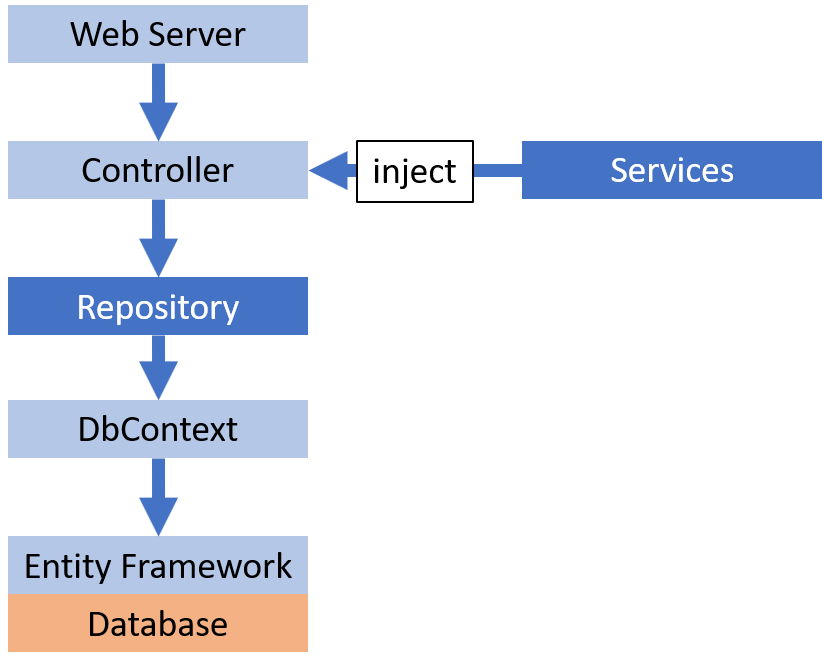
You can read more about injected services in the post Dependency Injection trong ASP.NET Core
So there you go: the Repository plays the role of an intermediate layer between the Business Logic Layer (controllers and services) and the Data Access Layer (the DbContexts)
2.1. The reasons
Separating logic handling from database access
- Easier to trace bugs
- Easier to unit test
- Easier to change the logic or the database
Gathering many basic tasks in one place
- No writing the same task over and over
2.2. Implement
Concretely, the Repository has these jobs: listing the records - getting 1 record - adding - deleting - editing 1 record
The problem: managing students
Create the interface
using System;
using System.Collections.Generic;
using ContosoUniversity.Models;

namespace ContosoUniversity.DAL
{
    public interface IStudentRepository : IDisposable
    {
        IEnumerable<Student> GetStudents();
        Student GetStudentByID(int studentId);
        void InsertStudent(Student student);
        void DeleteStudent(int studentID);
        void UpdateStudent(Student student);
        void Save();
    }
}
The code above declares a classic CRUD set (Create - Read - Update - Delete)
Create the implementing class
using System;
using System.Collections.Generic;
using System.Linq;
using System.Data;
using ContosoUniversity.Models;

namespace ContosoUniversity.DAL
{
    public class StudentRepository : IStudentRepository, IDisposable
    {
        // SchoolContext inherits from DbContext and adds DbSet<Student>
        private SchoolContext context;

        public StudentRepository(SchoolContext context)
        {
            this.context = context;
        }

        public IEnumerable<Student> GetStudents()
        {
            return context.Students.ToList();
        }

        public Student GetStudentByID(int id)
        {
            return context.Students.Find(id);
        }

        public void InsertStudent(Student student)
        {
            context.Students.Add(student);
        }

        public void DeleteStudent(int studentID)
        {
            Student student = context.Students.Find(studentID);
            context.Students.Remove(student);
        }

        public void UpdateStudent(Student student)
        {
            context.Entry(student).State = EntityState.Modified;
        }

        public void Save()
        {
            context.SaveChanges();
        }

        private bool disposed = false;

        protected virtual void Dispose(bool disposing)
        {
            if (!this.disposed)
            {
                if (disposing)
                {
                    context.Dispose();
                }
            }
            this.disposed = true;
        }

        public void Dispose()
        {
            Dispose(true);
            GC.SuppressFinalize(this);
        }
    }
}
Inject this repository into the Controller or Service (remember to register it in Startup.cs first)
public class StudentController
{
    private readonly IStudentRepository _studentRepository;

    public StudentController(IStudentRepository studentRepository)
    {
        _studentRepository = studentRepository
    }
}
2.3. Performance Hit
When Entity Framework queries a record or a set of records in the database, it returns an IQueryable. Only when you call .ToList(); is the SQL statement generated and sent to the database.
In the StudentRepository above, if you want to filter a list of students named “ABC”, you’d have to write this in the controller
public IActionResult GetStudents(string name)
{
    // The SQL has been generated, every student in the db has been returned and held in memory
    var allStudents = _studentRepository.GetStudents();

    // this filter only filters in memory
    var filteredStudents = allStudents.Where(x => x.Name.Contains(name));

    return View(filteredStudents);
}
This is very bad code when the student table has millions of records while you only need a handful of them.
In the next section you’ll learn how to fix this problem, and also implement a generic repository for the basic CRUD tasks
3. Generic Repository
Basically we’ll use C#’s generic class declaration to implement a generic repository
using System;
using System.Collections.Generic;
using System.Linq;
using System.Data;
using System.Data.Entity;
using ContosoUniversity.Models;
using System.Linq.Expressions;

namespace ContosoUniversity.DAL
{
    public class GenericRepository<TEntity> where TEntity : class
    {
        // SchoolContext inherits from DbContext
        internal SchoolContext context;

        // This generic repository works on the entity passed in when registered in Startup.cs
        internal DbSet<TEntity> dbSet;

        public GenericRepository(SchoolContext context)
        {
            this.context = context;
            this.dbSet = context.Set<TEntity>();
        }

        // Expression<Func<TEntity, bool>> filter: lets you pass in a LINQ-style filter expression
        public virtual IEnumerable<TEntity> Get(
            Expression<Func<TEntity, bool>> filter = null,
            Func<IQueryable<TEntity>, IOrderedQueryable<TEntity>> orderBy = null,
            string includeProperties = "")
        {
            IQueryable<TEntity> query = dbSet;

            // Query is an IQueryable, only executed when the list value is needed
            if (filter != null)
            {
                query = query.Where(filter);
            }

            // Next, it includes the properties the caller asked for
            foreach (var includeProperty in includeProperties.Split
                (new char[] { ',' }, StringSplitOptions.RemoveEmptyEntries))
            {
                query = query.Include(includeProperty);
            }

            // Finally, it executes by translating into an SQL statement and calling down to the database
            if (orderBy != null)
            {
                return orderBy(query).ToList();
            }
            else
            {
                return query.ToList();
            }
        }

        // in asp.net, an object's Id can be a GUID or an int
        public virtual TEntity GetByID(object id)
        {
            return dbSet.Find(id);
        }

        public virtual void Insert(TEntity entity)
        {
            dbSet.Add(entity);
        }

        // in asp.net, an object's Id can be a GUID or an int
        public virtual void Delete(object id)
        {
            TEntity entityToDelete = dbSet.Find(id);
            Delete(entityToDelete);
        }

        public virtual void Delete(TEntity entityToDelete)
        {
            if (context.Entry(entityToDelete).State == EntityState.Detached)
            {
                dbSet.Attach(entityToDelete);
            }
            dbSet.Remove(entityToDelete);
        }

        public virtual void Update(TEntity entityToUpdate)
        {
            dbSet.Attach(entityToUpdate);
            context.Entry(entityToUpdate).State = EntityState.Modified;
        }
    }
}
4. Creating the Unit of Work class
Unit of Work has exactly one job: making sure all of your repositories share one DbContext. This way, once all the database-changing work is done, you only call DbContext.SaveChanges() once and those changes get saved to the database
using System;
using ContosoUniversity.Models;

namespace ContosoUniversity.DAL
{
    public class UnitOfWork : IDisposable
    {
        private SchoolContext context = new SchoolContext();
        private GenericRepository<Department> departmentRepository;
        private GenericRepository<Course> courseRepository;

        // Check whether the repository has been created yet
        public GenericRepository<Department> DepartmentRepository
        {
            get
            {
                if (this.departmentRepository == null)
                {
                    this.departmentRepository = new GenericRepository<Department>(context);
                }
                return departmentRepository;
            }
        }

        // Check whether the repository has been created yet
        public GenericRepository<Course> CourseRepository
        {
            get
            {
                if (this.courseRepository == null)
                {
                    this.courseRepository = new GenericRepository<Course>(context);
                }
                return courseRepository;
            }
        }

        public void Save()
        {
            context.SaveChanges();
        }

        private bool disposed = false;

        protected virtual void Dispose(bool disposing)
        {
            if (!this.disposed)
            {
                if (disposing)
                {
                    context.Dispose();
                }
            }
            this.disposed = true;
        }

        public void Dispose()
        {
            Dispose(true);
            GC.SuppressFinalize(this);
        }
    }
}
The next step is changing the controller’s code to use the UnitOfWork class you just created
// Get data
var courses = unitOfWork.CourseRepository.Get(includeProperties: "Department");

// Get and order data
var departmentsQuery = unitOfWork.DepartmentRepository.Get(orderBy: q => q.OrderBy(d => d.Name));

// Insert
var course = new Course();
course.Name = "Test";
...
unitOfWork.CourseRepository.Insert(course);
unitOfWork.Save();

// Dispose
unitOfWork.Dispose();
5. Wrap-up
So you now understand the concept and the declaration of the Repository and Unit of Work patterns. You also know how to use lambda expressions to query the data matching the conditions you want through the IQueryable interface. Have fun :D