[04-09-2013] Dreamspark - Cách gia hạn tài khoản hoặc lấy Registration Code
If you don’t have a Windows Store Dev or Windows Phone Dev account yet, you can register one
Note: a visa card is required
After registering comes the step where you pay for the account. The fee is $99 / year. But if you are a UIT student, you can register for free without paying that fee.
Step 1: go to the following address:
https://www.dreamspark.com/Student/Windows-Store-Access.aspx

Step 2: click the Verify Now button
[![04-09-2013 3-25-39 PM[8]](http://cuoilennaocacban2.files.wordpress.com/2013/09/0409201332539pm8.png "04-09-2013 3-25-39 PM[8]") ](http://www.flickr.com/photos/28322228@N04/9670335057/)
](http://www.flickr.com/photos/28322228@N04/9670335057/)
Pick I Do not have a DreamSpark account

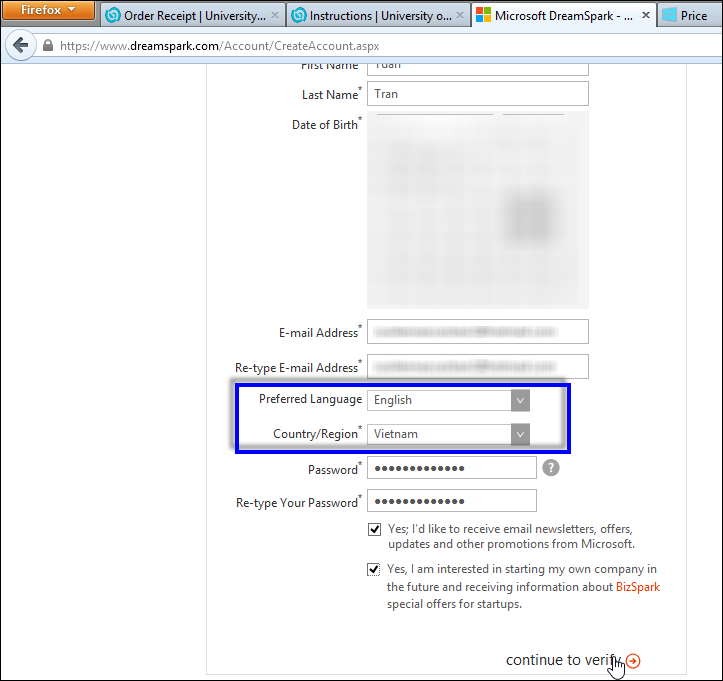
Fill in your information. For Country, pick Vietnam. It works in your favor later on
Wait for it a moment


Type your school name and pick it. It searches for you automatically

Enter your gm.uit.edu.vn email address

Check your mail

Follow the instructions in the mail


The Status has become Verified. Click Get Code Now


Enter the code you got into the Registration Code box, click Update total

Done. It’s free now


